> For the complete documentation index, see [llms.txt](https://docs.leap-blockchain.com/llms.txt). Markdown versions of documentation pages are available by appending `.md` to page URLs; this page is available as [Markdown](https://docs.leap-blockchain.com/leap-telegram-bot/leap-telegram-setup/telegram-scraper.md).
# Telegram Scraper
Telegram scraper is used to scan Telegram channels for contract addresses and auto-trade them based on your filters, and strategy.
### What is Telegram Scraper
1. You securely link your own Telegram account (one-time phone verification).
2. You pick the channels/chats to monitor.
3. When a CA appears, Leap can alert you or auto‑buy using your profile settings.
**Highlights**
* Monitor multiple channels and multiple Telegram accounts.
* Per‑channel trading profiles (buy size, slippage, filters, TP/SL, black/whitelists).
* Post‑author whitelisting and token/keyword blacklists.
Requirements
* An active Telegram account with a phone number.
* Your **Telegram API ID** and **API Hash** (free from Telegram).
***
## Connect Your Telegram Account
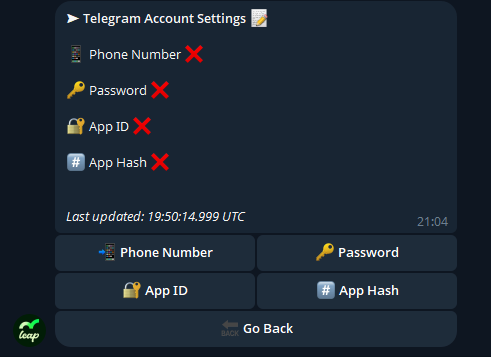
When first clicking on **Telegram Scraper** you will have a message pop-up saying **the following:**
Simply click **Account Settings** which will open a new panel with information you will need to fill in.
***
### Step 1 — Get your Telegram API ID & API Hash (5 minutes)
1. Open [**https://my.telegram.org**](https://my.telegram.org/) and log in with the Telegram account you’ll link to Leap.
2. Click **“API development tools / Apps”**.
3. Create a new app:
* **App Title**: *Leap Bot* (any name works)
* **Short Name**: *leapbot* (any short slug)
* **Platform**: *Web* (or the most appropriate option)
* **URL**: leave blank (optional)
4. Submit. You’ll see your **API ID** and **API Hash**. Keep these safe—you’ll need them in Step 2.
> Keep your API Hash private. Anyone with it could try to log in as you.
***
### Step 2 — Link Telegram inside Leap Bot
1. In Leap, go to **Scrapers → Telegram**.
2. Click **Add Telegram Account**.
3. Enter your **phone number** in full international format (e.g., `+44…`).
4. Paste your **API ID**.
5. Paste your **API Hash**.
6. Add you **Password**
7. Telegram will send a one‑time **verification code** (via Telegram/SMS). Enter it exactly as shown.
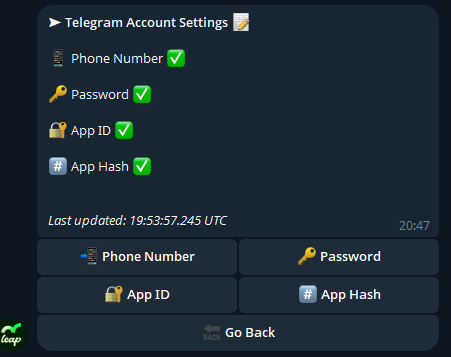
8. You should see a **success** notice and then your Telegram Account window should look like this.
***
### Create Telegram Scraper Tasks
Once your Account has been sucessfully set up you can click **Go back**. This will take you to the **Telegram Scraper Task Menu**, here you will be able to change **Fees** for buys and sales, **Buy amount, Entry and Exit Strategy**, and select **Market Filters.**
The **Fees** Page have already been covered, so if you have any doubts here please refer to: [Fees](/leap-telegram-bot/leap-telegram-setup/fees.md)
**Buy Amount** is also very straight forward, this is the amount each of your **Telegram Scrape Autobuys** will use to buy the coins scanned. To change this simply press **Buy Amount**, and type the Amount in SOL **in chat**
Next setting is **Telegram Scraper Filters**, which is where you will select which **Telegram Channels** and **Telegram Users** to target. You also have check options for **Listen to Own Messages**, and **Listen to Bots** which is useful for **Automated** **Telegram Signal Channels**. In here you also have settings for **Website**, and **Token Filters**.
**Target Channel Instructions:**
If you're using a channel as the target, the bot will monitor it for any contract posts. If the chat is **unlocked**, it's best to **wait until just before drop time or after it gets locked** to avoid interacting with fake contracts.
To retrieve the Channel ID, open telegram via web browser - [https://web.telegram.org](https://web.telegram.org/) and do the following:
1. Navigate to the channel.
2. Look at the URL — it will contain a sequence of numbers that start with -, it can be something like `-100` or `-214`.
3. **Remove the dash (-)** and **the first three digits** (e.g., `-2143108337`becomes `3108337`).
To find the **topic ID**:
1. Enter the topic in the channel.
2. Click **"View Topic Info"**.
3. The URL will look like this: `https://t.me/c/2205123457/33636`.
* The **channel ID** is the number before the last slash.
* The **topic ID** is the number after the last slash.
Using the example above, enter this in the Task's Channel ID field: `2205123457/33636`
To Find **User IDs:**
**1.** Add our telgram bot to your telegram [**https://t.me/leaptrading\_bot**](https://t.me/leaptrading_bot)
**2.** Forward a message from any user to our bot
**3.** Our bot will show the User ID for that user
***
**The market, token and social filters have their own subsection in this Docs as they are recurring settings for all modes. So if you have any questions about that you can read about them here:**
* [**Market Filters**](/leap-telegram-bot/leap-telegram-setup/market-filters.md)
* [**Website Filters**](/leap-telegram-bot/leap-telegram-setup/website-filters.md)
* [**Token Filters**](/leap-telegram-bot/leap-telegram-setup/token-filters.md)
***
### Safety & best practices
* Use a **dedicated Telegram account** for scraping if possible.
* Protect your **API Hash**—do not share it. Rotate if you suspect exposure.
* Add **keyword blacklists** (e.g., “airdrop”, “test”, “dev”) to reduce noise.
* Use **user ID whitelists** for higher signal quality in large groups.
***
### Troubleshooting
**Didn’t receive a verification code?**
* Check you entered the correct international phone number and have Telegram installed/logged in.
* Try SMS vs. in‑app code if offered.
**Login failed after code entry**
* Re‑add the account and carefully re‑enter the phone/API ID/API Hash.
* If you have 2‑Step Verification in Telegram, ensure you also enter your Telegram password when prompted.
* Try a different Telegram account if repeated failures occur (Telegram may rate‑limit).
**No CAs detected**
* Confirm the **channel is public or you’re a member** of the private channel.
* Review your **filters/blacklists**—you may be filtering everything out.
**Auto‑buys not triggering**
* Verify the channel is **Active** and linked to the correct **Trading Profile**.
* Check your **wallet balance**
* Review **min liquidity / min age / anti‑honeypot** filters that can block buys.
***
### FAQs
**Can I link multiple Telegram accounts?**\
Yes. Add as many accounts as you would like in the accounts tab. You can assign channels from different accounts to different tasks.
**Will Leap read my private messages?**\
Only channels/chats you explicitly add for scanning are parsed. Nothing else is ingested.
**Is this allowed by Telegram?**\
You authenticate using official API credentials from Telegram’s developer portal. Usage must comply with Telegram’s Terms of Service.
**Can I use Alert‑only?**\
Absolutely. You can run your accounts in the monitors tab and manually trade, or enable auto‑buy per channel once comfortable.
***