# Sniper Mode
### Migration Sniper
Buy the instant a token **migrates** off its launch platform (Pump.fun, Dynamic Bonding Curve, Launch Labs, etc.) — or **auto‑sell** if you’re already holding. Use this when teams push to Raydium/CLMM or another pool and you want first fills or a clean exit.
#### How it works
* **Buy on migrate**: Watches the target token’s migration event; as soon as the new pool/pair is active, places your configured buy on the platforms you allow (Raydium, Pump.fun/Swap, Meteora).
* **Sell on migrate**: If you already hold the token, instantly sells your position when migration is detected.
***
**Setup — Step by step**
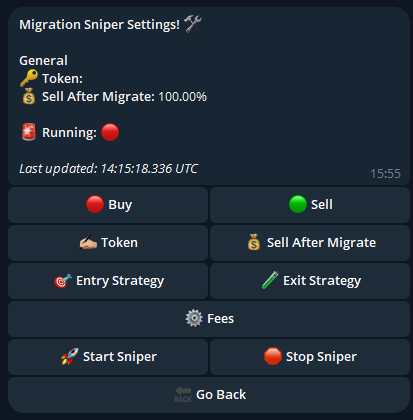
1. **Token:** Paste the token’s **CA**. This is mandatory so the bot knows which migration to track.
2. **Buy/Sell:** Toggle Buy or Sell - based on if youre sniping the migration or want to sell on migration.
3. **Sell/Buy After Migrate:** Allows you to put Amount to buy/sell after migrate.
4. [**Entry Strategy**](entry-strategy)
5. [Exit Strategy](exit-strategy)
6. [Fees](fees)