> For the complete documentation index, see [llms.txt](https://docs.leap-blockchain.com/llms.txt). Markdown versions of documentation pages are available by appending `.md` to page URLs; this page is available as [Markdown](https://docs.leap-blockchain.com/leap-telegram-bot/leap-telegram-setup/market-filters.md).
# Market Filters
🧰**Market Filters** lets you setup **Filters** based on **Market Cap, Liquidity, Volume, Transactions, Migration Filters and Markets.**
***
📊**Market Cap Filters -** Allows you to setup **Min/Max Market Cap** to enter at, aswell as **Min/Max Market Cap** at the **Launch** of the Coin
* **Min/Max Market Cap ($):** Set the range for acceptable token market caps.
* **Min/Max Market Cap on Launch ($):** Set the range for acceptable token market caps at the point of launch. This is mainly used for believe tokens.
***
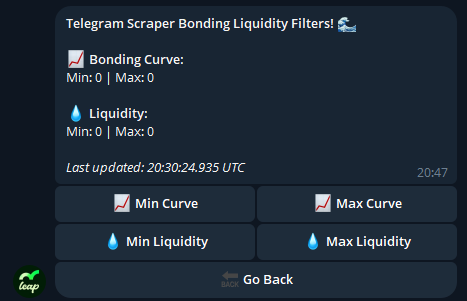
🌊**Liquidity Filters -** Allows you to setup Filters based on **Bonding Curve Progress**, and **Liquidity.**
* **Min/Max Bonding Curve (%):** Define the bonding curve progress range for buys.
* **Min/Max Liquidity ($):** Only buy tokens within this liquidity range.
***
📈**Volume Filters -** Allows you to setup Filters based on the Minimum **1 Minute, 5 Minute, 15 Minute, 30 Minute, 1 Hour and 24 Hours Volume**
* **Min/Max 1-Min Volume / Mcap (%):** Set the % ratio of volume in the last minute to the market cap. I.E. if a coin is at 20K market cap and has 2k volume in the last minute that would be a ratio of 10%
* **Min/ 1-Min Volume ($):** Set the min amount of volume in dollars there should be in the last minute to activate a buy
* **Min/ 5-Min Volume ($):** Set the min amount of volume in dollars there should be in the last 5 minutes to activate a buy
* **Min/ 15-Min Volume ($):** Set the min amount of volume in dollars there should be in the last 15 minutes to activate a buy
* **Min/ 30-Min Volume ($):** Set the min amount of volume in dollars there should be in the last 30 minutes to activate a buy
* **Min/ 1-Hour Volume ($):** Set the min amount of volume in dollars there should be in the last 1 Hour to activate a buy
* **Min/ 24-Hours Volume ($):** Set the min amount of volume in dollars there should be in the last 24 Hours to activate a buy
***
🏦**Transaction Filters -** Allows you to setup Filters based on **Amount of Transactions for buy/sell** made on the coin, **Min/Max Holders** and **Min/Max Token Age.**
* **Min/Max Buy Transactions:** The amount of buy transaction there should be in the last 24 hours.
* **Min Holders Count:** Set the minimum amount of holders that should be in the coin for you to buy
* **Min/Max Token Age (Seconds):** Only buy tokens within this age range.
***
🔥**Liquidity Migration Filters -** Allows you to setup filters based on the **Liquidity Burnt** and **Previous Migrated Coins by Dev.**
* **Min Liquidity Burn:** Set the minimum amount of liquidity that should be burnt for you to buy
* **Max Liquidity Burn:** Set the max amount of liquidity that should be burnt for you to buy
* **Min Past Migrations:** Set the minimum amount of migrations the dev should have previously achieved in order to activate a buy transaction
***
💰**Buy Options -** Allows you to select which markets to buy from. Simply tick the boxes of markets you want to buy from.