> For the complete documentation index, see [llms.txt](https://docs.leap-blockchain.com/llms.txt). Markdown versions of documentation pages are available by appending `.md` to page URLs; this page is available as [Markdown](https://docs.leap-blockchain.com/leap-telegram-bot/leap-telegram-setup/copy-trade.md).
# Copy Trade
The **Copy Trade** feature in **Leap** allows you to **automatically mirror trades** from selected wallets. Whether you're copying a **top-performing trader** or managing multiple strategies, this tool offers **flexibility**, **control**, and **customizable settings** to align with your goals.
***
## :clipboard: Copy Trade Overview
When accessing the **Copy Trade** feature, you'll be presented with two main options:
* **Create New Copy Task:** Start a new copy trading configuration from scratch.
* **Manage Copy Tasks:** View, edit, or control your existing copy trade tasks.
This overview helps you stay organized and manage your copy trade strategies effectively.
***
## :gear: Configure Your Settings
Each copy trade task comes with its **own set of customizable settings** to help you **manage risk** and **optimize performance** based on the wallet you're copying.
* **Wallet Address**: List of wallets you want to copy.
* **Minimum Buy (SOL)**: The minimum SOL you want to spend per trade. *Overrides any other setting.*
* **Maximum Buy (SOL)**: The maximum SOL you want to spend per trade. *Overrides any other setting.*
* **Buy/Sell %**: The % of each buy/sell from the wallet you are copying you want to follow (e.g., `20` = copy 20% of their trade).
* [Fees](/leap-telegram-bot/leap-telegram-setup/fees.md)
* [Market Filters](/leap-telegram-bot/leap-telegram-setup/market-filters.md)
* [Entry Strategy](/leap-telegram-bot/leap-telegram-setup/entry-strategy.md)
* [Exit Strategy](/leap-telegram-bot/leap-telegram-setup/exit-strategy.md)
* **Smart Copy: Toggle On/Off**\
Allows you to Copy multiple Wallets and only enter if certain criterias are fulfilled. The criterias are the following:\
\- **Wallet List:** Add a list of wallets you want to run Smart Copy on.\
\- **Hit Amount:** The minimum number of wallets from your list that need to buy the same coin to activate your copy.\
\- **Time Range (ms)**: The maximum time window (in milliseconds) during which the wallets must buy the same token for you to copy.
Settings work **independently** for every copy trade task, allowing you to create **unique configurations** based on the trader.
{% hint style="warning" %}
After creating your tasks, remember to **start them** from the **Manage Copy Tasks** menu.
{% endhint %}
***
## :bar\_chart: Manage Copy Trade Tasks
Managing your copy trade tasks is divided into **two main sections** for better clarity and control:
### Manage Menu Overview
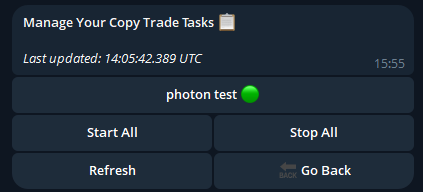
In this menu, you’ll find an **overview of all your active copy trade tasks**. Here, you can:
* **Start All Tasks:** Activate every configured task simultaneously.
* **Stop All Tasks:** Pause all running tasks at once.
This section is perfect for **quick, global control** over your copy trade operations.
{% hint style="info" %}
Each **copy trade task** operates independently, allowing you to set **unique configurations** for every wallet you follow. This ensures **flexibility** and **precise control** over your trading strategies.
{% endhint %}
***
## :white\_check\_mark: Monitor & Adjust
You're all set up. Copy trade tasks will automatically execute trades based on the wallet you're mirroring. You can **refresh your tasks overview** at any time to see the latest status and make changes as needed.
{% hint style="success" %}
You will receive **Real-Time Notifications** when a copy trade task performs a **buy or sell transaction**, including a **transaction link** for you to check key details.
{% endhint %}